Workload Benchmarking
Numbers don't lie. This guide shows you how to measure the real-world performance difference between daisy-vllm and stock vLLM on AMD ROCm GPUs , across execution latency, throughput, and GPU kernel time.
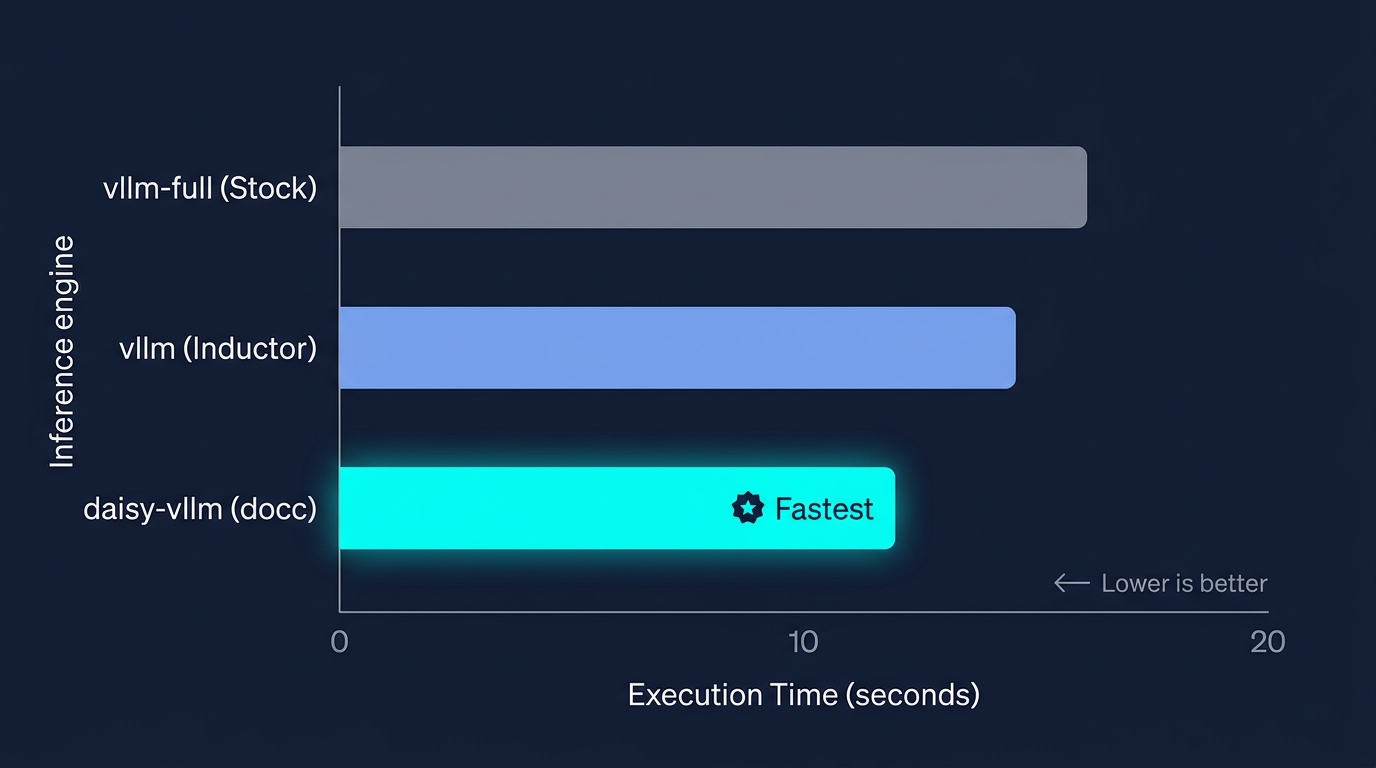
Illustrative comparison across three engine modes. Lower is better. Run the benchmarks below to see your own hardware-specific results.
1. Environment Setup
Enter the container environment:
make shell
Inside the container shell, compile the docc compiler backend and install daisy-vllm:
make build-all
What
make build-alldoes:
- Compiles
third-party/doccagainst the container's ROCm LLVMclang++toolchain.- Installs
docc-compileranddocc-pytorch.- Installs
daisy-vllmin editable mode (pip install -e .).
2. Standard Benchmark Workloads
The repository includes three standardized workload benchmarks under benchmark/, each designed to stress different aspects of the inference pipeline:
| Workload | Script | What It Tests |
|---|---|---|
| Poem | benchmark/qwen2_poem.py | Creative text generation , evaluates time-to-first-token (TTFT) and sustained decode speed. |
| Question | benchmark/qwen2_question.py | Single-turn QA , measures prompt ingestion speed and fast response latency. |
| Summary | benchmark/qwen2_summary.py | Long-context summarization , evaluates sustained prefill throughput and decode under long contexts. |
3. Engine Comparison Modes
Each benchmark supports comparing across three execution engines via the -e flag. This is how you see the difference daisy-vllm makes:
Engine Flag (-e) | Mode Name | Description |
|---|---|---|
-e vllm | vLLM Inductor | vLLM compiled via stock PyTorch Inductor (VLLM_COMPILE). Piecewise graph execution with generic library kernels. |
-e vllm-full | Stock vLLM Baseline | Plain vLLM with default configs. The unoptimized baseline. |
-e daisy-vllm | daisy-vllm (docc) | vLLM accelerated with docc optimized ROCm kernels. MLP layers compiled through the docc backend. |
4. Running the Benchmarks
Run each workload in bfloat16 across the three engines to see how they compare:
A. Creative Poem Workload
python benchmark/qwen2_poem.py -dt bfloat16 -e vllm
python benchmark/qwen2_poem.py -dt bfloat16 -e vllm-full
python benchmark/qwen2_poem.py -dt bfloat16 -e daisy-vllm
B. Question Answering Workload
# Use -p to print the generated response
python benchmark/qwen2_question.py -dt bfloat16 -e vllm
python benchmark/qwen2_question.py -dt bfloat16 -e vllm-full
python benchmark/qwen2_question.py -dt bfloat16 -e daisy-vllm -p
C. Long-Context Summarization Workload
python benchmark/qwen2_summary.py -dt bfloat16 -e vllm
python benchmark/qwen2_summary.py -dt bfloat16 -e vllm-full
python benchmark/qwen2_summary.py -dt bfloat16 -e daisy-vllm
5. Key Metrics
For a time to first-token (TTFT) measurement and an estimate of inter-token latency, run make inference_benchmark inside the container. This invokes benchmark/e2e_inference.py and writes a JSON report.
When evaluating output across the engines, compare these three numbers:
| Metric | What It Measures | Why It Matters |
|---|---|---|
| Total Execution Time (s) | Wall-clock time for the complete prompt-to-response generation. | The bottom-line end-to-end latency. |
| Time to First Token (TTFT) | Prefill latency , how long to ingest the prompt context. | Critical for interactive experiences. |
| Time per Output Token (TPOT) | Decode latency during iterative token emission. | Determines perceived generation speed. |
The daisy-vllm engine should show reduced total execution time compared to both vllm and vllm-full , particularly in decode-heavy workloads where the MLP GEMM kernels are invoked repeatedly across every generated token.